Final Cut Pro X Babbling

Deep Thoughts about FCP X, and why you should be using it.

Tracks vs. Roles Redux – Versioning

Posted by fcpxpert1 on October 14, 2015
Posted in: FCPX At Work. Tagged: FCP 7, FCP X Workflow. 6 Comments

A little while ago, right here on my fancy blog, I stated my opinion in the “debate” over tracks vs. Roles. I like Roles. This isn’t to say they are perfect, there are things they could do that they don’t, and hopefully Apple is grinding away trying to make them even more powerful.

In any case, I had a job recently that provides an excellent example of how Roles simplify one of the most confusing and convoluted tasks we often need to do, outputting multiple versions, with different A/V configurations, of multiple spots.

This gig consisted of 5 different spots, cutdowns of a trailer done by another editor in FCP 7. Now, you may be thinking,…“WHY?!”, which his another topic entirely. 🙂 But, I’ve done the cutdowns in old faithful, and it’s time for finishing, here’s what I need to deliver:
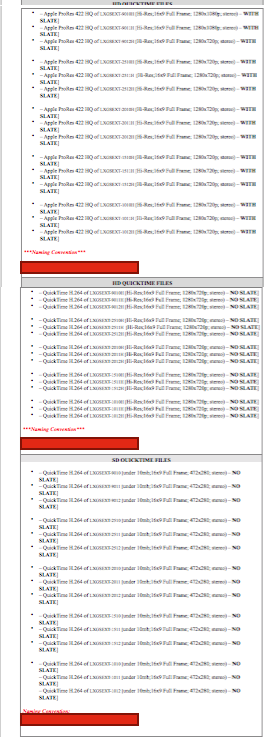
delivery listFor each of the 5 spots: 2 tagged texted versions, 1 generic version, and 1 textless version. 3 versions require a 4ch split audio version (Comp/M&E), the textless version requires an 8ch combined mono/stereo split. All but the textless need a 2ch comp version as well. One texted version gets an audible rating, all other versions do not. All versions need unique slates. Also 3 duplicate 2ch versions with no slate are needed, and these 3 versions then must be delivered in 3 different codecs/resolutions.
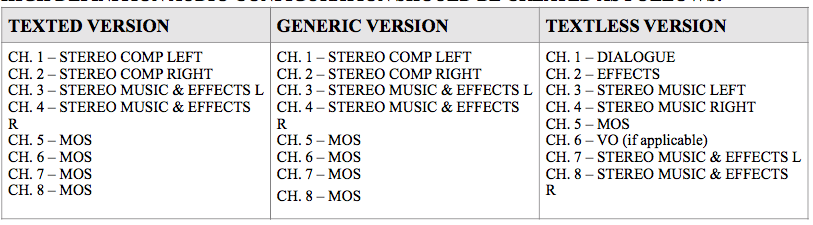
splits

So a little math yields the following: 50 versions. Now, I could of course do this in in 7 or Pr or MC. I could make 2 or 3 different sequences for every spot (for the 3 audio configurations), put all the correct picture elements and slates on separate tracks in the proper sequences, and then very carefully enable/disable what’s needed for each version. I’ve done this. It works fine. It is also a huge pain in the ass, and you can very easily miss something. Screw that. Here’s what I did.

First, in FCP 7, I created a split audio master of the first texted version of each spot. I then exported 3 other master picture versions of each. Had I done the final output from a track based NLE I likely would have done this anyway as it’s easier to manage, but with all the different slates and audio versions, it still would have been a… what’s the word?… Oh, right… a clusterfuck.
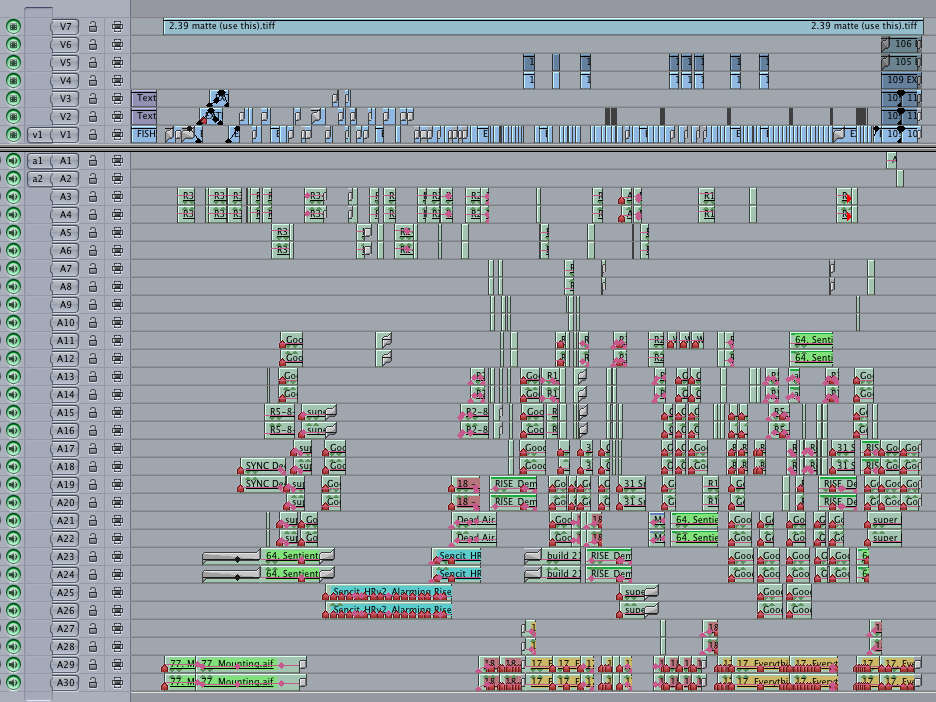
fcp7

Then, in FCP X using a Motion Template I made, I created 35 slates (15 outputs have no slate). That took a while, and would have needed to be done no matter which NLE I was in. Then, exported as png’s and reimported.

template

Next, import all the A/V Masters and assign Audio and Video Roles to everything, including the slates, corresponding to the proper versions. Using Role-O-Matic for audio saved some time, but the Role assignment process only took about 15 minutes. Then, create 5 master projects, (hit “D” once and “Q” 7 times for each project…no patching!), add a bit of MOS slug, a little trimming and I’m all set to go. That took maybe 5 more minutes. Here’s the result…
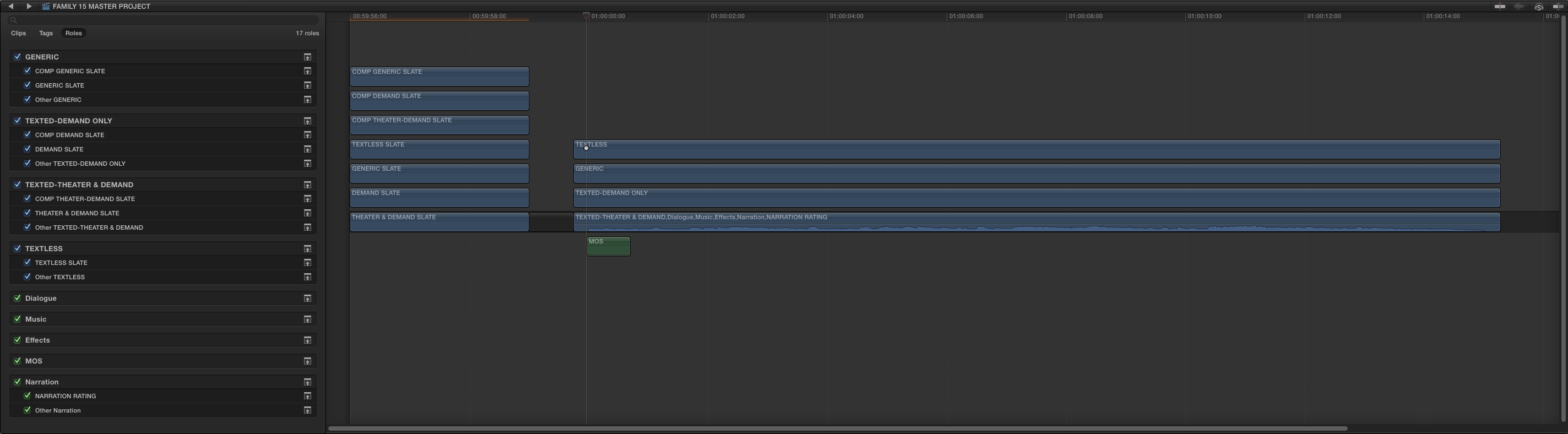
xproj2

Next step is to create Share presets. Set the default Export preset. Share a spot, create a preset and save it, cancel the share, repeat ’til done. Each preset specifies the picture version, matching slate, and audio configuration. Another 5 minutes. EZ…
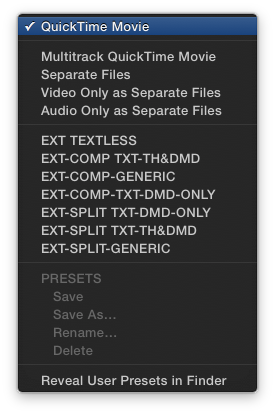
presetsinx

So, all in, 25 minutes of setup, probably less than prepping all the sequences in another NLE, (never mind the incessant disabling enabling, switching sequences and other fiddling during the export), and I’m essentially done.

All I gotta do now for each spot is CMD-E, 2 clicks for proper output config, ENTER, paste filename from a list, ENTER… 10 seconds per file. No enabling/disabling clips and switching sequences for every version. Oh, I do need to select a range excluding the slate for the 3 slate-less versions of each, so that’s another couple seconds.

Get coffee, wander back to my bay, drop all the slate-less versions in Compressor, apply a group setting to make the 2 low res versions of each… Done

Honestly, had these spots been originally cut in X, none of the prep at all would have been necessary. Zero. No splits, no master version exports. The Roles would have been assigned from the start.  Just make the slates and Export presets and go.

Roles kick ass, and they could do a whole lot more, so send your demands to Apple! 🙂

EDIT: Just finished exporting, and I was a little optimistic. Very little 😉 I needed to select different folders for the outputs as I went, so it took an average of 19 seconds for each export, all 50 versions were done in 17 minutes. Off to run the Compressor group to make the low res versions…

El Capitan 3’rd Party Updates

Posted by fcpxpert1 on September 30, 2015
Posted in: Updates. Tagged: El Capitan. Leave a comment

For Pro App users, here’s a little list of 3’rd part compatibility info and updates for El Capitan. Will add to it as I find things… Also, always check the excellent Roaring Apps page.

Apogee Digital Compatibility Matrix

Intelligent Assistance Apps Are Compatible

Essential CoreMelt Updates

Izotope Audio Plugin Workaround <– cached Google version, original was removed. Be careful!

All Red Giant Products are Compatible

All Digital Rebellion Products are Compatible

El Capitan and FCP (X and 7) … UPDATE: It’s out…

Posted by fcpxpert1 on September 28, 2015
Posted in: Opinion. Tagged: FCPX. 12 Comments

Update: 10.11 is  out. Here’s a link to essential CoreMelt updates, and an Izotope Audio Plugin workaround.

Update 2: 10.11.2 is out, and fixes the stabilization rendering issue some have reported. The TC window UI glitch is partially fixed, but numbers are still offset… Also, Izotope’s stuff works now, and most major plugins have been updated…

In the next couple days, OS X 10.11, El Capitan, will be unleashed. Generally, I’m the moron who immediately updates anything the second it appears, and I happily tell everyone else to do the same. But this time, if you’re using Pro Apps, I’d recommend holding off for a bit. And by “a bit”, I mean until Pro App and 3’rd party plugin updates appear.

That’s not to say your apps won’t work, they will.  In fact, those of you who stubbornly refuse to give up FCP 7 – (what is wrong with you?!?) – will be thrilled to learn that it still works. This is probably it’s last gasp, but it’s still kicking. 🙂

EL CAP

And while there are some little UI oddities, FCP X works just fine too. The problem is with plugins. El Capitan contains some fairly significant changes to the GPU code in preparation for “Metal”. It also restricts access to certain system locations, essentially making the “sandbox” more secure.

Screen Shot 2015-09-28 at 10.48.13 PM

As you can see, I’ve had some issues with audio plugins, and CoreMelt has posted that the Slice/Track/Drive X plugins will need to be updated. (see updates above for fixes)  I’m sure there are others with similar issues, I haven’t really tried everything.

UPDATE: Izotope  plugins now work. 🙂

Ben Balser has a related post on his blog, which you may want to check out. He reports that Color Finale won’t work properly though it seems OK for me. Anyway, I’m not as strident in my warnings. Honestly, If you don’t use any 3’rd party plugins, you may be OK. But if you do, don’t dive in just yet. Leave that to fools like me!

Anyone Who Prefers Tracks Over Roles is Deluded.

Posted by fcpxpert1 on August 3, 2015
Posted in: Opinion. Tagged: Adobe Premiere Pro, Final Cut Pro X. 4 Comments

😦
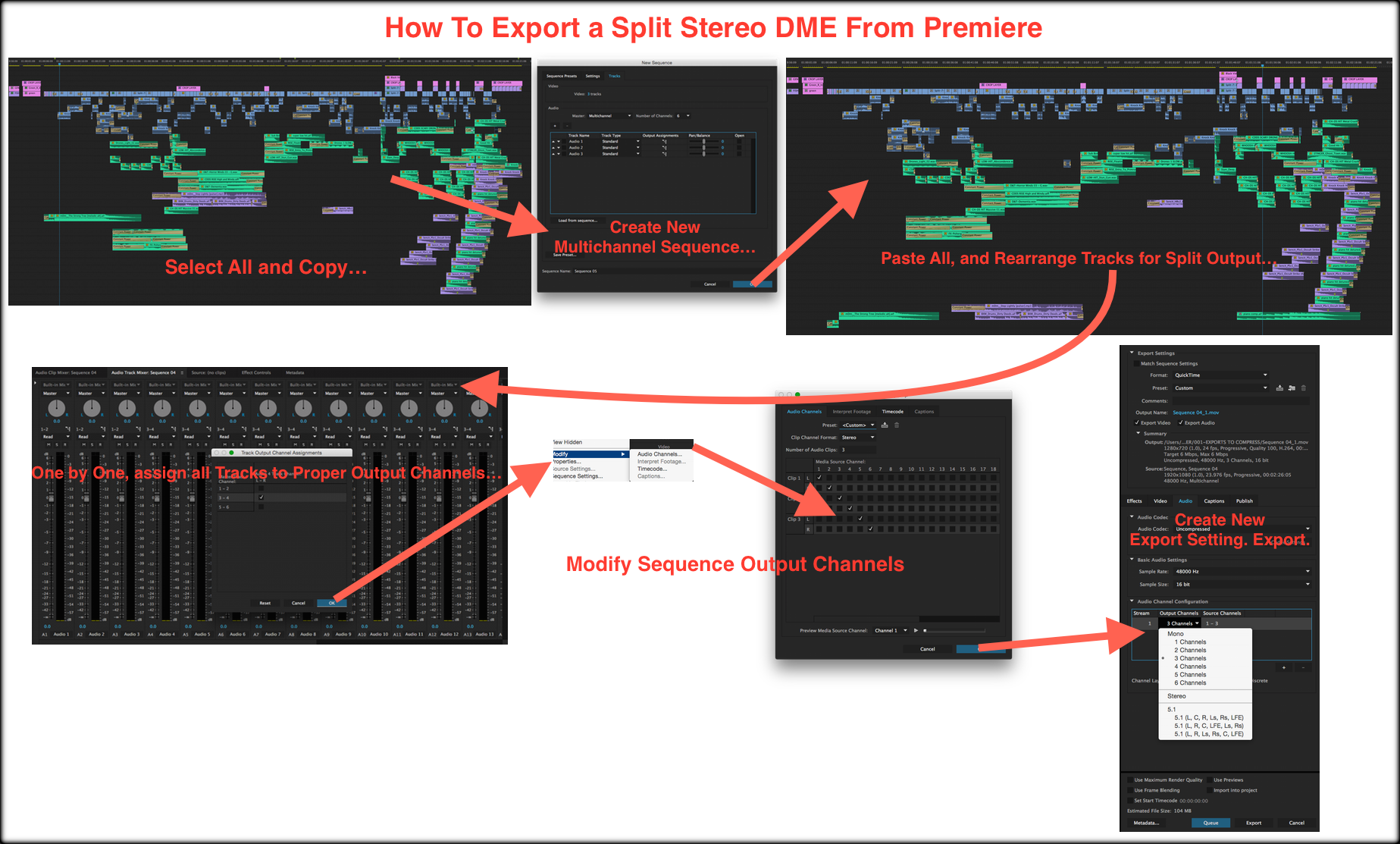
Pr Export2

🙂
xport2

It’s been pointed out that you do need to set your Roles properly in FCP X to enable this process. Takes about 10 seconds when you import files, (Role-O-Matic helps with more complicated situations) so I guess that’s 1 more step…

And… it’s been further pointed out that setting Roles is the equivalent of patching tracks, so it isn’t an extra step. This would be true… if you only needed to patch tracks once. This (obviously) isn’t the case. No matter how you slice it, it’s demonstrably easier to export splits from FCP X.

GeekCo. Role-O-Matic 3 – Batch Set Multichannel Audio Roles and Subroles and Name Components

Posted by fcpxpert1 on July 15, 2015
Posted in: Random Junk. Tagged: FCP X Workflow, FCPX Tools. 18 Comments
Update: The release of FCP X 10.3 has made R.O.M unnecessary. It still works, but you don’t need it. If you’re using an older version of FCP X then it’s still useful, but you should update FCP X. 🙂
Update: Version 3.2 is out with a fix and revised instructions to avoid duplicating FCP X default audio Roles. In short, do not capitalize “dialogue”, “music”, or “effects” when setting your Roles. They’ll show as capitalized in FCP X when reimported. Only non-cosmetic change to the app is the default “dialog” Role in the prompts is now lowercase. (Thanks Sasu!)
Previous Update: Version 3 now renames Audio Components to match your Roles and Subroles. Components with existing custom names can be renamed, or left as they are.
If, for some reason, you do not want this renaming feature, click here to download Role-O-Matic 2. Same app minus the component renaming bit…

Ever need to set audio Roles on lots of multichannel clips? Open each one in a timeline, set the Roles, repeat ’til the end of time. Role-O-Matic ends the drudgery!

roleomaticiconThis little app allows you to batch apply common Roles and SubRoles on any number of A/V and Audio-Only clips, even if they have different channel configurations, all at once. If you have 6 reels of a DME split feature, tons of dailies or location audio, you can now set the roles on all channels in all the clips at once. It also names the audio components to match your roles and subroles, so you can see what they are in the Inspector and Timeline.
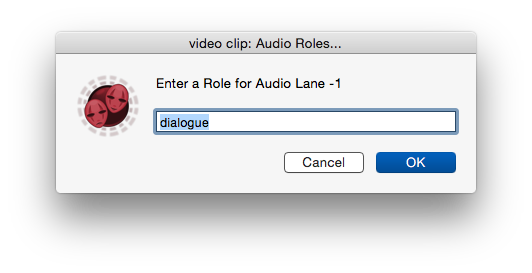
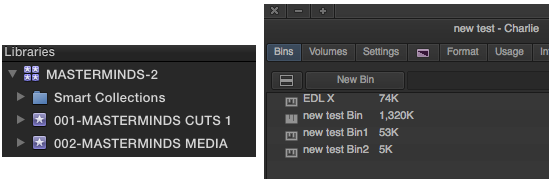
windowPut all the clips in an Event, Export fcpxml, run it through Role-O-Matic, and reimport. If you don’t understand why you would need this, don’t download it! If you do understand why it’s useful, I think you’ll like it.

ROMFLOW

The code that does the work was generously donated by someone smarter than I, so it’s probably not gonna change too much unless you are a coding guru and want to help me with it. It works great, and doesn’t modify any files or change your original fcpxml, so it’s pretty benign. It’s very easy to use, but please read the instructions carefully. They’re with the app or you can click here to read or download them now.

Click Here to Download Role-O-Matic 3.

Here’s a little demo/tutorial in my trademark rambling, semi-coherent style. As a bonus it was recorded with a crappy USB headset so I sound like Darth Vader, but without the cool vocal effects. I highly recommend turning on auto generated subtitles for some comedy. 🙂

Current known issues listed below. Will update here and in the app read me as needed.

In some cases certain channels in some clips may be muted/disabled in the Event created from R-O-M fcpxml. Simply unmute/re-enable them

Using spaces and other “illegal” characters may result in no Roles being set.

If you have files with interleaved stereo channels that are actually dual-mono, such as a lav on the left and a boom on the right, or interleaved surround files etc, Role-O-Matic cannot  add separate Roles to each component, only to the “master” component.

If clips have names in their metadata, and are then renamed in the inspector before you export xml, it puts the custom name in another element that ROM won’t change. For newly imported clips it should work as expected. Worse comes to worse you can always batch name ’em in the inspector though..

When reimported, stereo components/channels may be labeled “Reverse Stereo”. This isn’t caused by R-O-M, it happens even if you just re-import your original fcpxml. The stereo imaging is not changed, it’s just labeled incorrectly. I’ve sent feedback to Apple on this, you should too.

The imported Event will have the same name as the exported original with a “2” appended. The workaround is to rename the original Event before Importing the new fcpxml, or rename the new one when its imported. Or something. 🙂

It’s beta-ish, Please let me know if you have any problems not noted above.

Why Did Apple Rename Everything in FCP X?!?

Posted by fcpxpert1 on June 25, 2015
Posted in: Opinion. Tagged: FCP X 10.2. 2 Comments

Since the launch of FCP X, one of the questions that keeps getting asked, over and over and over again, is this: “Why did Apple change the names of everything? We’ve used ‘Project’, ‘Bin’, and ‘Sequence’ forever! It’s stupid!”  But maybe, just maybe, it isn’t stupid at all. Now, I’m not Apple, so this is all just conjecture, but I’d like to bore you with my thoughts about the name changes.

Library vs. “Project”

This one is easy.  Apple named things in FCP X  correctly, we’re all just used to referring to stuff incorrectly. 🙂  “Library” is defined as “a collection of films, recorded music, genetic material, etc., organized systematically…”. And “Project” is defined as “an individual or collaborative enterprise that is carefully planned and designed to achieve a particular aim”. In X, I use the contents of Libraries to create my Project. Sounds right to me. Moving on…

Event vs “Bin”

First of all, “Bin” is a stupid name for what is just a folder in NLE’s like FCP 7 and Premiere. A bin is a different beast in Media Composer, but it’s still a silly name in the digital age. Without a history lesson, it’s unlikely anyone under the age of 40 knows why they’re called bins. And people in the UK probably wonder why you’d want to put all your media and cuts into something with the same name as the garbage can. Good for Apple for changing it.

Editorializing aside, an Event is very much like a Bin in Media Composer. Your MC Project (Library) contains Bins (Events) you create in which you organize your media, cuts etc. You can’t open multiple Projects (Libraries) in MC, and you can’t have hierarchical folders in Avid Bins, but they’re functionally pretty much the same.

libvsbin

Though you can only have one Project at a time open in MC you can share entire Bins from one Project into another. In FCP X, with multiple Libraries open, you can move or copy entire Events to other Libraries. Same deal in FCP 7, since you can open multiple “Projects” you can copy entire “Bins” between them. In Premiere you can import sequences or entire Projects, but you can’t share a complete bin (folder) into another Project. If you could share FCP X Events between multiple users, they’d behave almost exactly like MC bins. Hmmmm.

In any case, “Event” is defined as “something that happens or is regarded as happening;
an 
occurrence,”  so I think it’s a good name. If you’re cutting a feature, each event might contain a scene. But going further, an FCP X Event is much more powerful than a flat MC Bin or a folder of folders as in 7 or Premiere. Using Keyword Collections, Smart Collections, Favorites/Rejects and Folders, what can quickly become an unmanageable mess of tabs and open “bins’ and stacked windows in other NLE’s, can be very nicely contained in a single occurrence in X. An Event. 🙂

Projects vs. “Sequence”

This bit is a little more long winded and I’ll refer to anything you can see in the browser as an “object”… In FCP X pretty much every media object in a container (mov, mp4, aiff, wav, etc.) can be opened to get at what’s inside. Individual components within these objects can also be opened up in the app. Like Russian Dolls, you can keep opening things up to reveal components of components etc.

In other NLE’s, the object which you open to assemble your cut is generally called a sequence or a timeline. You have media – master clips etc. – which you cut into a “sequence timeline” to create whatever it is you’re cutting. This is true in FCP X as well. The place in which you cut video and audio clips together is called The Timeline.

However, there’s a fairly significant difference between FCP X and other NLE’s. In X, pretty much any wrapped media object you import – video, A/V clip or audio –  can be opened from the browser in it’s own timeline. You’re not limited to opening objects the NLE creates.

openintl

In most NLE’s you can open NLE created objects (“Sequences”,  Nested Clips, and Multicam Clips) in the Timeline. That’s it. In FCP X there are multiple types of timelines. Like any NLE, empty FCP X Timelines can be created by the program (Projects, Compound Clips, Multicam Clips). But in X, many other media objects can be opened in their own Timelines. You’re not limited to just cutting things into empty or existing timelines.

You can select an A/V Clip in your browser, open it in it’s own timeline, and edit it’s components. You can open an Audio Clip in it’s own timeline and edit it. You can open a Project in it’s own timeline and edit it. You can open a Compound Clip (similar to a nested clip) in it’s own timeline, etc.

These aren’t timelines containing media, they’re the selected media objects viewed in their own timelines.
Edits made here will change the objects in the Browser. Click to view full size and make sense of it.
timeline types

Because of this, you need a way to identify the type of timeline, or sequence, in which you are editing whatever you are creating. Whether it’s a commercial, a feature, or a cat video for YouTube, It’s the “Project” you are working on. Yes, it’s different than the word Avid made up 26 years ago, but so what? Project makes sense.

If you think about it, “sequence” is just another name for “timeline” right? And a “timeline” is the place you construct something, not the the thing you’re constructing. You don’t “write a piece of paper”, you write a Story on a piece of paper. You don’t “paint a canvas”, you paint a Picture on a canvas. And you don’t “cut a sequence”… You cut a Project in a sequence (timeline).

So, when I work in FCP X, I am creating a “Project” in a timeline using “Collections” of media organized in “Events” contained within a “Library“. Seems pretty logical to me.

N L Evangelism…

Posted by fcpxpert1 on June 22, 2015
Posted in: Opinion. Tagged: Final Cut Pro X. 5 Comments

There’s a recent article by Scott Simmons at Pro Video Coalition that asks Are You… Defined By Your NLE? It’s quite good, check it out. In it he brings up the age old practice of NLE bashing, and uses examples from an FCP X-centric Facebook group where some people, who don’t use Premiere, love to denigrate it. I know there are plenty of examples of Adobe/Avid evangelists bashing FCP X, but I’d like to talk a bit about the FCP X evangelists.

Now, it’s probably obvious I’m a big fan of FCP X and it’s always my first choice, but it’s not the only NLE I use. One week I’ll be mostly in X, another in Premiere. Sometimes I still cut in 7, and I stay on top of Media Composer and Resolve. Hit Film and Lighworks are somewhere on my system as well. Not sure where, but I have ’em! Often I’ll be cutting different things at the same time in both X and Premiere. I prefer X, and I’d be lying if I said I was above a little NLE smack-talk myself. But, as I actually use the NLE’s I talk about, I try to be fair. I like to think I mostly succeed.

dock-fight DOCK FIGHT!

There is a lot of FUD (fear, uncertainty, doubt) about FCP X being spread on the internets, generally by people who don’t use it. (see a pattern here?) I’ve said this before, if you actually use an NLE for real – meaning you cut and complete actual jobs in it – then I’ll listen to you. If you only use one NLE, and would like to put down another, I respectfully invite you to STFU. Which, finally, brings me to the point of this post…

There are a number of very vocal supporters of FCP X who fall into the latter category. People who love to pontificate on the superiority of FCP X without any real clue as to:
A-what they’re talking about, or
B-what other NLE’s are actually capable of.

I participate in a bunch of NLE related forums, some of which have a lot of anti-FCP X participants, and I’m happy to engage in spirited debates with these folks. My feeling is that informed discussion is way more likely to change minds than unchecked, and often misinformed, evangelism. 

But more often than not, in the midst of a heated, yet (mostly) reasonable discussion, an FCP X evangelist will appear, post a paragraph or two of semi-insulting, generally misinformed bullshit, and completely ruin the discussion. If I was opening the door to someone accepting FCP X, the evangelism slams it shut.

These people do more harm than good to the adoption of FCP X by “professionals”. No NLE is perfect, and anyone who proclaims the one they prefer is perfect, is full of crap. There are many self-proclaimed Final Cut Pro “experts” on the web, but the folks you should listen to are those that have experience in multiple NLE’s. They can tell you the good, the bad, and the ugly, based on experience.

So, in closing, if you love a particular NLE, but have no experience with other NLE’s then please, try and keep the competition bashing and pontificating to a minimum. And if you are in that category of users, and FCP X is your love… Do all of us who are trying to help FCP X gain much deserved acceptance a favor. Shut up. All due respect of course.

Marginally Better Basic 3D Title

Posted by fcpxpert1 on June 19, 2015
Posted in: Random Junk. Tagged: Free FCP X Effect. Leave a comment

I like the new 3D titles in FCP X, not for making ridiculous extruded atrocities, but for just a subtle touch. It can really make your text look better. The preset animations are pretty good too. Sometimes though, you want to do your own little moves, and the titles from Apple don’t have any keyframe-able scale or rotation parameters. Even the Inspector’s Video tab only has a single “Rotation” adjustment.

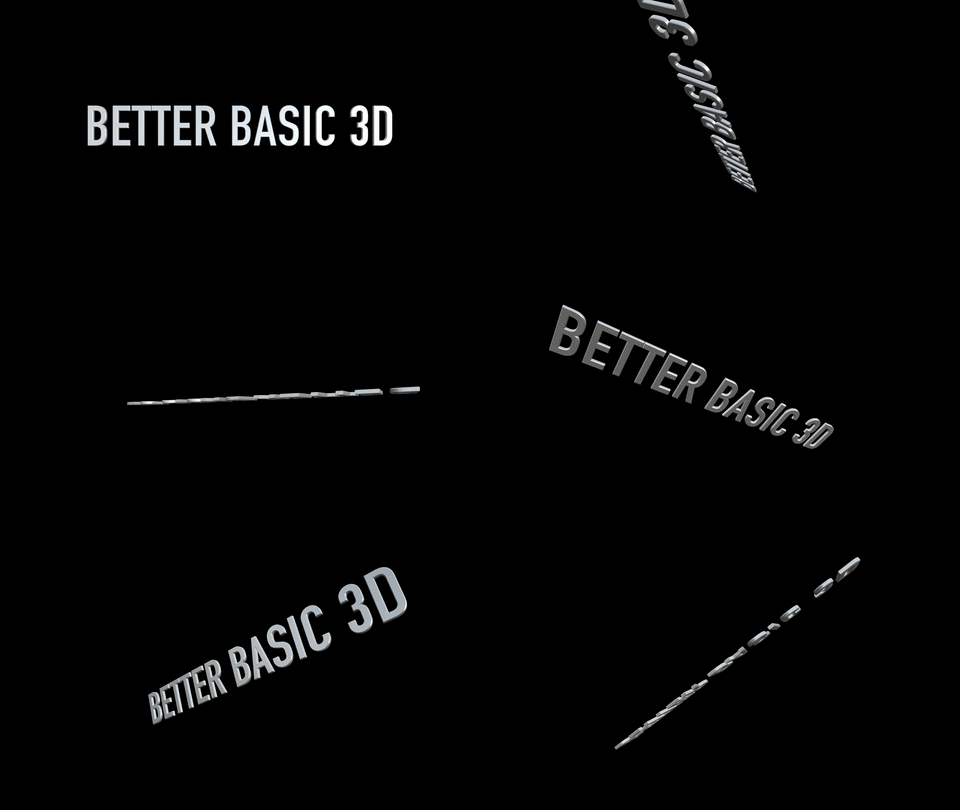
So… I made a copy of the Basic 3D Title, opened it in Motion, turned off the canned build in/out controls, and published Scale and Rotation XYZ parameters. For the heck of it I also published the Shear parameter. The Z scale parameter is kinda the same as 3D Depth, but I left it anyway…

addedparameters

rotate

You can do it yourself, but if you don’t feel like it, Click Here to download it. Hope it’s useful. And please do modify it and make it better! I really don’t know what i’m doing. 😉

N. L. Evolution…

Posted by fcpxpert1 on May 29, 2015
Posted in: Opinion. Tagged: Adobe Premiere Pro, FCP 7, Final Cut Pro X. 2 Comments

So I’m working on some stuff this week, and needed to move a project into FCP 7. Ran the fcpxml through Xto7 and spent about 5-10 minutes deleting disabled audio channels, and importing the GFX I had done in X that can’t be done in 7. Then, for laughs, I imported the sequence into PrCC.

In X, I had done some title cards, a quad split in a compound clip with Motion Generator animating dividing lines, some basic color corrections and a few effects added to some shots. I had to export the cards and the quad split thing as comped movies because the title tools in other NLE’s suck, and neither 7 or Pr could easily do the line animation stuff. Certainly possible, but more of a PITA than in X.

However, that tech crap isn’t the point of this bit of babbling. The point is, that when I work on the exact same project in all 3 NLE’s, it’s really apparent how much easier it is to get things done in X. (I was gonna do it in MC too, but it’d take half the day to AMA relink the media…) Not to say that there aren’t some things I miss from 7 and Pr when I’m in X, or that X is perfect, but overall FCP X is a much more pleasant place for me to work.

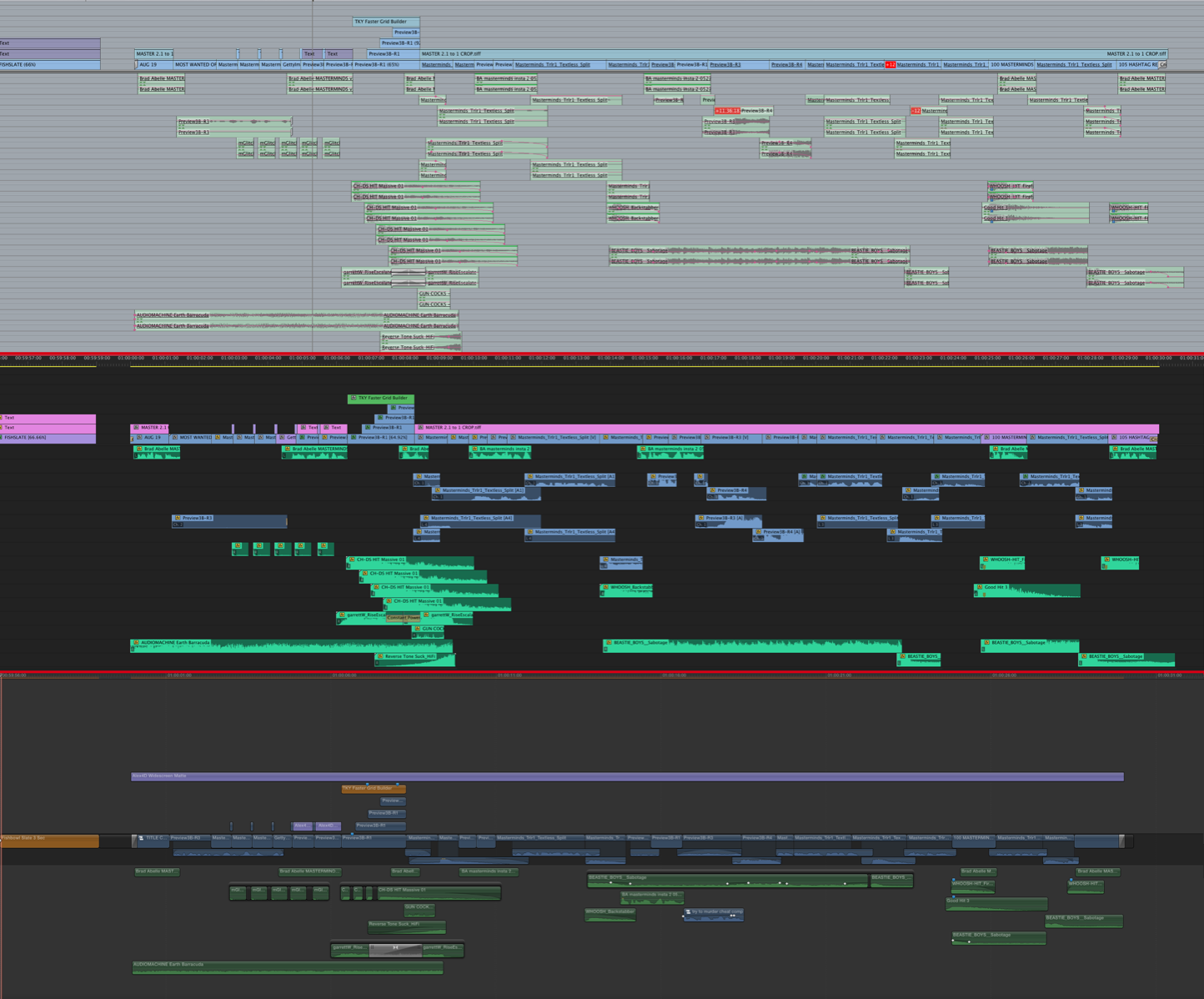
Here’s a little comparison, the same spot in all 3.  For the pics, just to be fair, I broke apart the comp containing the quad split in X. Nesting stuff is OK in Pr, but awful in 7. Working in Compound Clips and using Multichannel Secondary’s in FCP X is a huge timeline clutter/eye saver. I also just left the “text” clips that were adjustment layers in X. Could have redone ’em in Pr, but not in 7. Faster just to export as a comp from X.

But seriously, explain to me why anyone would actually prefer to stare at either of the top 2 screens all day. What a mess. 😉 For what it’s worth, I do stare at Pr and 7 all day quite often, so I’m qualified to whine about it. lol

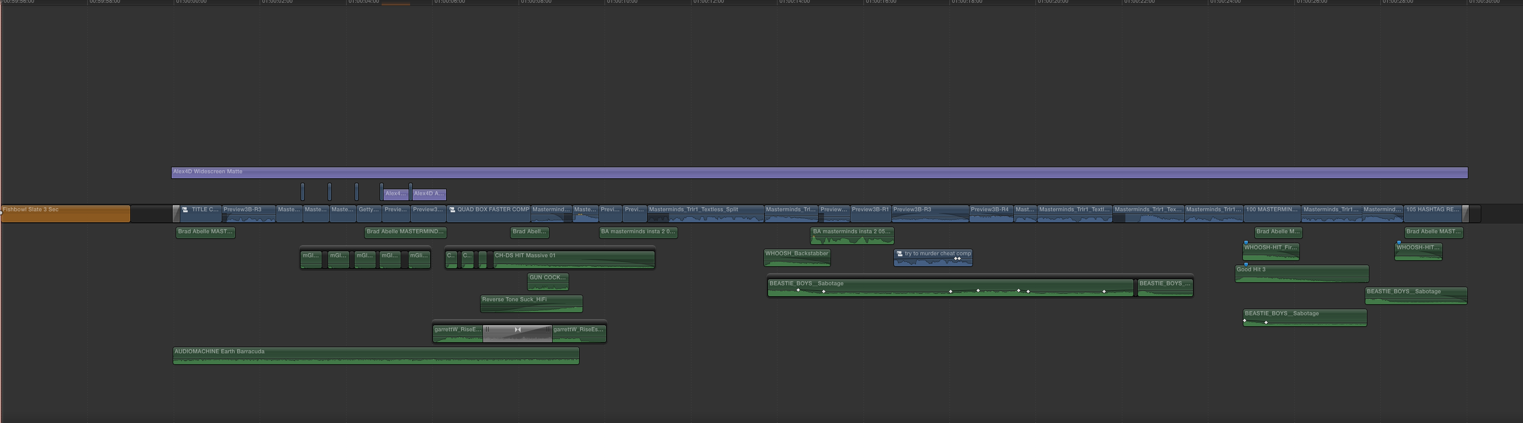
EDIT: by request, The FCP X timeline with everything collapsed added above the 3 shot. Clean!

collapsed

WHY

CoreMelt Free Source Timecode Plugin.

Posted by fcpxpert1 on May 26, 2015
Posted in: Tips, Workflow. Tagged: FCPX Tools, Free FCP X Effect. 5 Comments

Finally someone did it. 🙂 Roger and the folks at CoreMelt have released a free plugin to display Source (and Record) Timecode on clips in FCP X. I’ve been playing with it for a while. It works really well, and you can’t beat the price!

Screen Shot 2015-05-26 at 9.50.36 PM

Download CoreMelt Free here:  http://www.coremelt.com/download.html#free

And then..”After installation look for it under “C2 Gadget – Editors Tools” as Source Timecode.  Drop it on your clip and you’re good to go.  You can have it display only in the onscreen controls or burn in on render.”

Get it. And get their other stuff too, really great plugins. 🙂

Posts navigation

← Older Entries
Newer Entries →
  • Recent Posts

    • FCP 10.6 – Here We Go Again!
    • FCP Comes Through-An (old) Anecdote
    • Happy New Year!
    • LumaTouch – fcpxml Export to FCP X
    • Drive By Post – Multi NLE Workflow Fun!
    • 🎅🏼Christmas Crap – An FCP X Re-Gift!
    • FCP X update and Mojave Menu Glitch
    • Quick Tip – Save Open Windows On FCP X Quit
    • Great Doc about FCP X
    • Fade To Whatever – Dissolves in FCP X and Premiere
  • Post Finding Thing

  • Enter your email address to follow this blog and receive notifications of new posts by email.

  • Always Interesting

    • The JetHead Blog
    • digitalfilms
    • www.philiphodgetts.com/
    • Alex4D
  • Nerd Department

    • Create account
    • Log in
    • Entries feed
    • Comments feed
    • WordPress.com
Blog at WordPress.com.
The JetHead Blog

... the world from 40,000' at 500 mph.

digitalfilms

a blog by Oliver Peters

www.philiphodgetts.com/

Just another WordPress.com site

Alex4D

Deep Thoughts about FCP X, and why you should be using it.

Final Cut Pro X Babbling
Blog at WordPress.com.
Privacy & Cookies: This site uses cookies. By continuing to use this website, you agree to their use.
To find out more, including how to control cookies, see here: Cookie Policy
  • Subscribe Subscribed
    • Final Cut Pro X Babbling
    • Join 241 other subscribers
    • Already have a WordPress.com account? Log in now.
    • Final Cut Pro X Babbling
    • Subscribe Subscribed
    • Sign up
    • Log in
    • Report this content
    • View site in Reader
    • Manage subscriptions
    • Collapse this bar
 

Loading Comments...